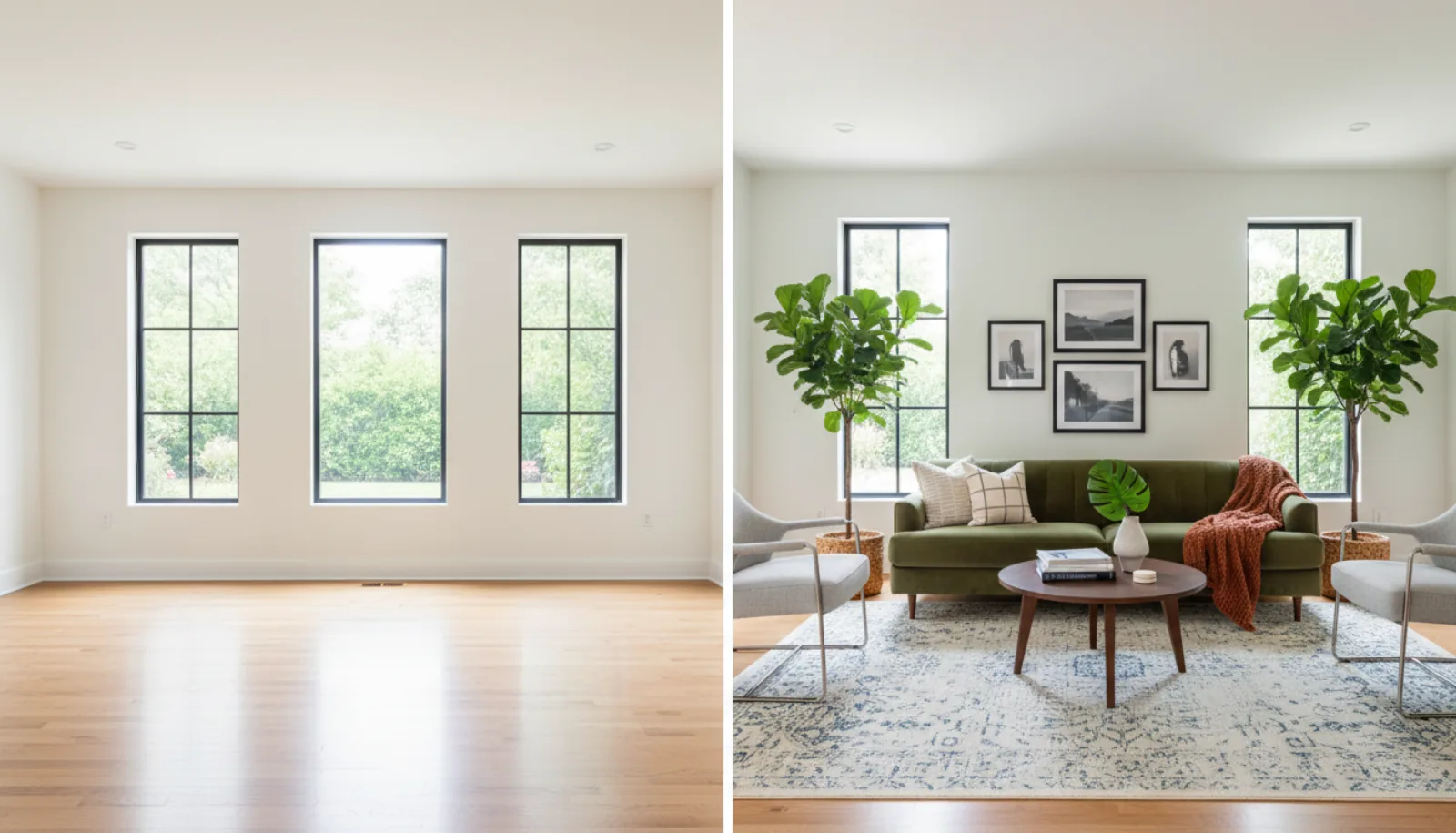
Vacant homes are hard to sell. Empty rooms look smaller, colder, and harder for buyers to picture themselves living in. Traditional staging costs $1,000-5,000 per property and takes days to set up.
AI vacant home staging solves this by filling empty rooms with photorealistic furniture in seconds, at a fraction of the cost. Over the past two years, virtual staging real estate workflows have moved from a “nice to have” to standard operating procedure for vacant listings, and the tooling has caught up: modern virtual staging programs render furniture, light, and shadows that hold up to MLS resolution and side-by-side review.
This guide is the long version. We compare the main virtual staging programs head to head, walk through how AI handles each room type in a vacant property, weigh virtual home staging software against hiring a real-life stager, and break down what the data actually says about how staging affects time on market.
Why Vacant Homes Need Staging
The numbers from NAR (National Association of Realtors) and major brokerage studies have been consistent for years:
- Empty homes sell for 3-5% less than comparable staged homes
- Vacant properties sit 30-50% longer on the market than staged equivalents
- Only ~10% of buyers can mentally picture furniture in an empty room
- 81% of buyers say staging makes it easier to see a property as a future home
- Listings with high-quality interior photos get 61% more online views in the first week
Empty rooms also create a second-order problem: buyers focus on flaws. Without furniture to draw the eye, every scuff, outlet, baseboard gap, and uneven wall reads as a maintenance item. Staging redirects attention to scale, layout, and lifestyle.
This is exactly the pain that virtual staging real estate tools solve, and it’s why even budget-conscious agents now reach for virtual home staging software before they touch a listing.
How AI Vacant Home Staging Works
The AI Process (30 Seconds)
- Upload – Add your empty room photo
- Analyze – AI detects walls, floors, windows, and dimensions
- Design – AI selects furniture appropriate for the room size and style
- Render – Photorealistic furniture is placed with accurate shadows
- Download – Get your staged image ready for the MLS
What Makes AI Staging Photorealistic
Modern AI staging uses:
- 3D furniture models – Not flat images, actual 3D objects
- Lighting analysis – Shadows match room lighting direction
- Perspective matching – Furniture angles match camera angle
- Scale detection – Furniture sized appropriately for the room
- Style coherence – All pieces match the selected design theme
A well-built virtual staging program does all of this in a single pass. You upload, pick a style, and the model handles segmentation, depth estimation, lighting, and re-render together. The output is a single composite image, not a Photoshop collage.
Vacant property staging programs compared
Most agents only need one tool, but it helps to know how the main vacant home staging programs differ on price, turnaround, and output quality before you commit. The table below compares the five virtual staging programs that come up most often in 2026 broker conversations.
| Program | Starting price | Per-image vs flat | Turnaround | Output quality | Free tier |
|---|---|---|---|---|---|
| BrightShot | €0.11/image (€19/mo Basic, 80 credits) | Flat subscription, 1 credit per image | 30-45 seconds | High — photorealistic, MLS-ready | Yes — free trial credits |
| BoxBrownie | $32/image | Per-image, human-edited | 24-48 hours | Very high — manual artist pass | No |
| Virtual Staging AI | $16/mo (Starter, ~6 images) → $2.67/image | Subscription with image cap | 15-30 seconds | High | Limited free preview |
| Collov AI | Free tier, then ~$0.17/image | Mixed | 30 seconds | Mid-to-high | Yes |
| Stuccco | $29/image | Per-image, human-edited | 24-48 hours | Very high — manual artist pass | No |
The split is clean: AI-first virtual staging programs (BrightShot, Virtual Staging AI, Collov) trade a small quality margin for instant turnaround and per-image costs that round to pennies. Hybrid/human services (BoxBrownie, Stuccco) charge $25-35 per image because a designer touches every render.
For most vacant listings, the AI tier is enough. You only need the human tier when the property has unusual architecture (curved walls, vaulted ceilings with skylights, mezzanines) or when a luxury listing demands hand-curated furniture selection. For everything else, virtual home staging software at $0.11-$0.20 per image wins on margin and on speed. See our virtual staging cost & pricing guide for a deeper breakdown of what each tier actually delivers.
Room-by-room: vacant living room, vacant bedroom, vacant kitchen
Different rooms reward different staging decisions. Below is what AI virtual staging programs actually do for each common vacant room type, and what to ask the tool to optimize for.
Vacant living room
The living room is the highest-leverage room in any vacant property. Buyers form an opinion within the first three photos of a listing, and the living room is almost always one of them.
What AI does well in a vacant living room:
- Places a sofa parallel to the longest wall and orients seating toward the focal point (window, fireplace, TV wall).
- Adds a coffee table at the right scale (rectangular for long sofas, round for small spaces).
- Anchors the seating area with an area rug, which makes hardwood and LVP floors photograph warmer.
- Adds a side chair or accent armchair if the room is wide enough for a conversational layout.
What to override manually: if the room has an obvious focal point (a stone fireplace, a bay window with a view), make sure the staging style you pick keeps the focal point uncluttered. A modern or Scandinavian style usually works better here than Traditional, which tends to over-furnish.
Vacant bedroom
Bedrooms are where most virtual staging programs get tripped up because bed scale is hard. A king bed in a tight room reads as cramped; a queen in a primary suite looks undersized.
What AI does well in a vacant bedroom:
- Centers the bed on the longest unbroken wall (away from the door swing).
- Adds matching nightstands and lamps, which restore symmetry buyers find calming.
- Drapes neutral bedding (white, oatmeal, soft grey) that doesn’t fight any wall color.
- Adds a small bench or rug at the foot of the bed if the room can carry it.
What to override manually: pick the bed size deliberately. For a primary bedroom over ~12x14 ft, ask for a king. Below that, a queen photographs better. For secondary bedrooms, a queen or full bed plus a small desk is a stronger lifestyle signal than a single bed alone.
Vacant kitchen
Kitchens are technically not staged the same way other rooms are — you don’t add a kitchen island, you add lifestyle. But vacant kitchens benefit enormously from light styling.
What AI does well in a vacant kitchen:
- Adds bar stools at the island or peninsula (instantly clarifies that the island is usable as eat-in seating).
- Places a fruit bowl, cutting board, or small appliance on the counter to break up empty cabinet runs.
- Adds a small herb plant near the window to add color and scale.
- Hangs a single piece of art or a clock on a blank wall, which helps depth perception.
What to override manually: don’t over-style. A vacant kitchen with three accessories looks lived-in; a vacant kitchen with twelve looks staged in the bad sense. Ask the tool for “minimal” or “light styling” rather than full furnishing.
Vacant dining room
Dining rooms are the most underrated win in virtual staging real estate work. Many vacant listings skip them entirely, but a staged dining room is one of the cheapest ways to add a perceived “extra room” to a floor plan.
- Match table size to room: a 4-seater for narrow rooms, a 6-seater for standard, an 8-seater only if the room genuinely accommodates one.
- Add a centerpiece (low — never block the chairs across from each other).
- A pendant light over the table is implied by good staging; you don’t need to render one.
Vacant home office
Post-2020, a staged home office is no longer optional in most markets. Even a small bedroom labeled “office or 4th bedroom” should be staged as an office in at least one photo.
- Desk against a wall (not floating in the middle unless the room is large).
- Task chair, monitor or laptop on the desk, a small shelf or credenza for books.
- One plant. Not three.
Vacant secondary bedroom
This is the room where virtual home staging software pays back the most because empty secondary bedrooms are the single biggest reason buyers under-value 3- and 4-bedroom listings. Stage it as a guest room, a kid’s room, or an office depending on the comp set in the neighborhood.
Vacant home staging software vs hiring a real stager
This is the comparison that decides budget for most agents. Below is the honest version, with no marketing spin.
| Dimension | AI virtual home staging software | Hiring a physical stager |
|---|---|---|
| Cost per vacant listing | $0.11-$5 per image, ~$1-$50 for a full listing | $1,500-$5,000 per property (often more in luxury) |
| Setup time | Upload to download in under a minute | 1-3 weeks from booking to install |
| What buyers see in person | Empty rooms (with disclosed virtual photos online) | Fully furnished rooms during showing |
| Ability to revise | Re-render in seconds, try multiple styles | Locked in once installed; reshoots cost more |
| Best for | 90%+ of listings, especially under $1.5M | Luxury, ultra-luxury, model homes, vacant new construction at scale |
| Showing experience | Buyer arrives to an empty room (mismatch risk) | Buyer arrives to the staged scene they saw online |
| Risk | Disclosure complaints if not labeled | Damage, install delays, scheduling conflicts |
The honest take: virtual home staging software wins on cost, speed, and flexibility. Physical staging wins on the showing experience — there’s still no AI substitute for a buyer walking into a furnished home and feeling at home immediately.
The pragmatic 2026 approach most listing agents use:
- Default: virtual staging on every vacant listing under $1.5M.
- Add physical staging for luxury, hard-to-comp, or stale listings that need a reset.
- Always disclose virtual staging in the listing description and watermark the staged photos.
For a side-by-side look at what AI staging actually produces, our staging before and after gallery walks through real vacant rooms staged in BrightShot.
How vacant home staging affects time on market
Time on market (DOM) is the single metric that determines whether a vacant property is profitable. Every extra week a vacant home sits costs the seller mortgage interest, utilities, insurance, HOA dues, and lawn care — frequently $1,500-$3,000 per month in carrying costs alone, before any price reduction.
The data on staging and DOM is well documented:
- NAR’s Profile of Home Staging consistently reports that staged homes sell faster than non-staged comparables. Recent industry studies put the gap as high as 73% faster for well-staged listings.
- The Real Estate Staging Association has long reported that vacant homes staged before listing sell 6-10x faster than vacant homes listed empty.
- Internal data from major virtual staging providers shows vacant listings with at least 5 staged photos receive 40-60% more saved-listing actions on Zillow and Redfin.
Why do vacant homes sit longer in the first place?
- They photograph poorly. Empty rooms look smaller, the floor looks bigger, and odd architectural choices (off-center light fixtures, outlets at strange heights) get amplified.
- They generate fewer thumbnail clicks. The MLS thumbnail and the first three Zillow photos do most of the work; an empty room is a low-CTR thumbnail.
- Buyers misjudge scale. Without a sofa for reference, buyers consistently estimate rooms as 20-30% smaller than they actually are.
- Showings convert worse. Buyers walk through empty homes faster, ask fewer questions, and rarely return for a second look.
Virtual staging programs fix #1 and #2 immediately. The thumbnail goes from “empty box” to “warm room with a focal point,” and the click-through rate on the listing rises in lockstep. The follow-on effect on showings, offers, and DOM is what justifies the $19/month subscription many times over on the first sale.
For agents listing several vacant properties per quarter, virtual home staging software is one of the highest-ROI line items in the entire marketing budget — frequently returning 50-100x its cost on a single closed deal.
Best AI Tools for Vacant Home Staging
1. BrightShot (Best Value)
- Cost: €0.11/image
- Speed: 30-45 seconds
- Styles: 15+ curated options
- Extras: Lighting enhancement, video tours, window views, virtual staging
- Best for: Agents wanting an all-in-one virtual staging real estate workflow
2. Virtual Staging AI
- Cost: $2.67/image (starter plan)
- Speed: 15 seconds
- Styles: 30+ options
- Extras: Multi-view staging
- Best for: Agents wanting maximum style options
3. Collov AI
- Cost: Free tier available, $0.17/image paid
- Speed: 30 seconds
- Styles: 20+ options
- Extras: Basic photo enhancement
- Best for: Testing AI staging before subscribing
4. BoxBrownie
- Cost: $32/image, human-edited
- Speed: 24-48 hours
- Best for: Luxury listings where a designer touch is required
5. Stuccco
- Cost: $29/image, human-edited
- Speed: 24-48 hours
- Best for: Agents who prefer outsourced design selection over AI control
Getting the Best Results from AI Staging
Photo Tips
- Lighting: Shoot during daylight, all lights on
- Angle: From the corner for maximum room visibility
- Height: Camera at chest height
- Clear: Remove any remaining items first
If the property still has clutter (boxes, leftover furniture, debris from the previous owner), run those photos through a decluttering pass before staging — AI virtual staging programs work best on a truly empty canvas.
Style Selection
- Modern: Clean lines, neutral colors — works for most properties
- Scandinavian: Light, airy — perfect for smaller spaces
- Traditional: Classic furniture — established neighborhoods
- Coastal: Beach vibes — waterfront or warm climates
- Industrial: Urban edge — lofts and converted spaces
Match the style to the comp set, not your personal taste. A 1990s suburban colonial does not need an industrial loft makeover; it needs a Modern-Traditional blend that matches the buyer demographic for the neighborhood.
Common Mistakes to Avoid
- Too much furniture (makes rooms look smaller)
- Wrong scale (oversized furniture in small rooms)
- Mismatched styles (different looks in connected rooms)
- Ignoring room function (living room furniture in bedroom)
- Skipping disclosure (an MLS complaint can cost more than the entire staging budget)
Disclosure and Compliance
Virtual staging disclosure rules vary by state and MLS:
- Always: Add a “Virtually Staged” watermark or note
- California: Disclosure is required by law as of January 2026
- MLS rules: Most require clear labeling on every staged image
- Best practice: Include at least one unstaged photo of every staged room
BrightShot provides optional watermarks and MLS-friendly export settings out of the box, so the staged image you download is ready to upload without a manual edit pass.
Stage Your Vacant Listing Now
Transform empty rooms into move-in ready spaces in 30 seconds. First staging free.
Start FreeReal Estate Agent Notes
“I had a vacant condo sit for 4 months with no offers. After AI staging with BrightShot, I got 3 offers in the first week. Total cost: €2.50.” — Maria R., San Diego Realtor
“AI staging cut my average days on market from 45 to 18 for vacant properties. It’s now standard for every empty listing.” — James T., Austin Real Estate Team
Start Staging Today
Vacant homes without staging leave money on the table. At €0.11 per image, AI vacant home staging is one of the highest-ROI line items you can put on a listing.
Next steps:
- Create a free BrightShot account
- Upload empty room photos
- Select a style and stage
- Download and upload to the MLS
- Track the impact on showing requests and DOM
Don’t let empty rooms drag down your listings. Try AI vacant home staging free and see the result in 30 seconds.